A video with my face and voice, without filming myself: what worked and what didn't
How I built the badge congratulation videos with AI: Kling for the image, my cloned voice and Lip Sync. Why each piece fails on its own and how to fix it.
Contains AI-generated images or voice
Also available in: Spanish · Portuguese
When a student earns a badge on jmochon.training, they get a congratulation video from me. I didn’t film myself for it: it’s made with AI from four photos of me. This is the final result (the video is in Spanish; the badge is called “Chroma limpio”, a clean key):
It didn’t work the first time. The interesting part isn’t the tool, it’s why each piece fails on its own and how to fix it, because you’ll run into the same failures on any project like this. Here it is step by step: what I did, what failed, why, and what I’d do if I repeated it.
1. The image: Kling from real photos
Kling is an AI video generator (from the Chinese company Kuaishou): you describe a scene in text and, if you want, give it reference images, and it returns a clip a few seconds long. You use it from its website and it runs on paid credits.
What I did. I used its reference feature (Omni-Ref) with four photos of me: two serious and two smiling. I asked for a locked-off camera, a medium close-up (chest up) and a plain green background. The green background isn’t a whim: it lets me key myself out later and put myself anywhere, which is exactly what this badge celebrates.
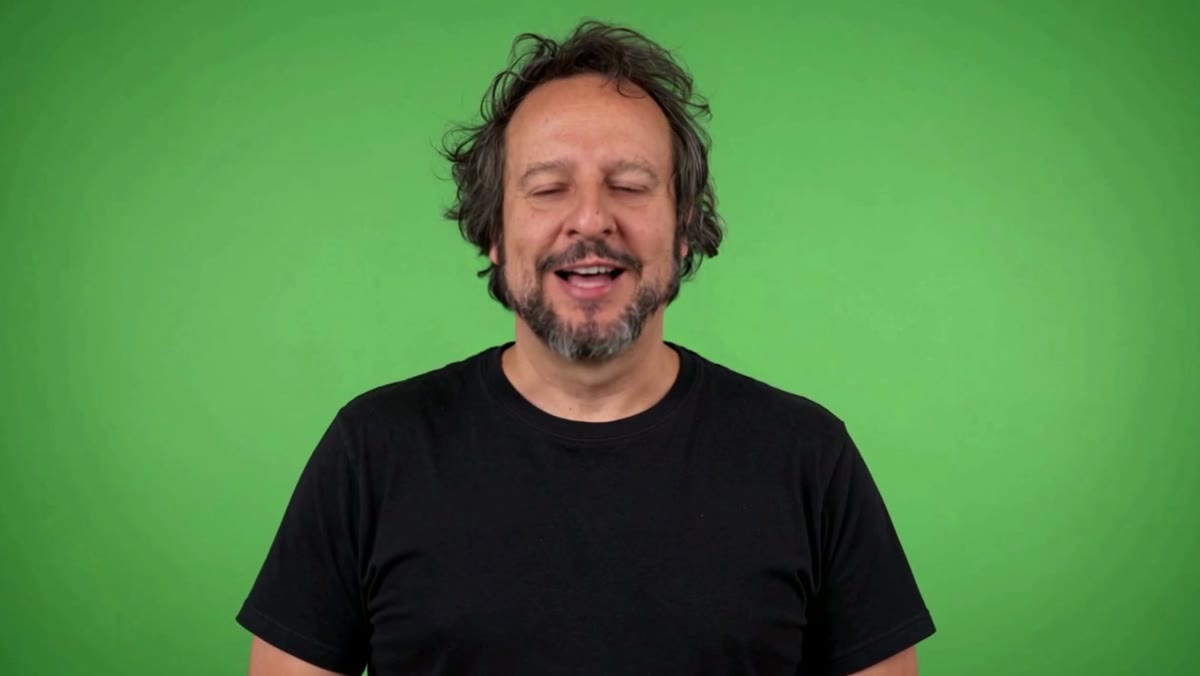
What failed. Two small things and one big one. The small ones: I asked for a finger snap and it waved at me instead, and in earlier tests it counted on its fingers whenever the script said a number. The big one, the voice, is step 2.
Tip. Also write what you don’t want in the prompt: relaxed eyelids and natural blinking (otherwise the stare freezes), a closed-lip smile, and still hands when the script mentions figures. And generate one at a time: an 11-second clip at 720p costs about 110 credits, and every retry costs the same.
2. The voice: why Kling’s doesn’t work
What failed. I gave Kling my cloned voice as a reference audio, expecting it to use it as is. It doesn’t. Kling re-voices the text in the prompt and uses your audio only as a guide for timbre. I measured it by comparing the two waveforms: they barely resemble each other (a correlation of 0.2 out of 1). The result sounds like someone who resembles me reading a script: flat intonation, and the pauses aren’t mine.
What I did. I separated the two things: Kling only for the image, and the voice always mine. I generate it with a clone of my voice that runs locally (Voicebox). I made six takes of the same script, with two different punctuations, and picked one for its intonation. I rejected one because “key” came out sounding like “que”.
Tip. In the script for the voice, spell foreign words the way they’re pronounced. My script is in Spanish, so I write “Croma” instead of “Chroma” and “qui” instead of “key”. A voice clone reads what it sees on the page.
3. Joining my voice and the image: the path that didn’t work
This is the part that teaches the most. I had lips (those in the Kling video) moving for its voice-over, and a voice (mine) with a different rhythm. This is the result of each attempt, one after the other:
Attempt 1: laying my voice on top and fitting it. I detected the eight stretches where the Kling video speaks and stretched or squeezed each sentence of my take to last exactly as long as its stretch, without changing the pitch. Technically it lined up to the millimetre: every stretch within 30 milliseconds. And you can still tell (it’s the second part of the video above). The problem isn’t timing, it’s the shape of the mouth: Kling’s lips draw its syllables, and my consonants don’t land where the mouth closes. On top of that, any word that wasn’t in Kling’s original voice-over (one take started with an “Oye”, Spanish for “hey”) has no lips to say it.
What worked: Lip Sync. The Kling website has a feature that does the opposite: instead of adapting the voice to the mouth, it rebuilds the mouth for your audio. You give it the clip and your voice, and the audio comes out identical (a correlation of 1 out of 1) with the mouth re-animated. It costs 15 credits and takes about six minutes. One practical detail: I had to pick the clip from my Kling “Assets”; uploading the mp4 straight to the panel didn’t work.
Tip. If your voice and your image come from different places, don’t try to fit the voice to the mouth: it’s the mouth that has to follow the voice.
4. The key and the edit
What failed. The first chroma filter I tried ate my black T-shirt: in dark areas, a key that measures “how much does this colour look like green” gets confused easily.
What I did. A key based on green dominance: for each pixel, how far the green channel exceeds red and blue. The background has a very dominant green and goes away; the black T-shirt has no dominant green and stays. Then despill: limiting each pixel’s green to the higher of the other two channels, to remove the greenish edge in the hair. On top of that, a warm colour correction to match the sunset in the background (an image also generated with Kling) and a blurred background that drifts very slowly, so it doesn’t look like a pasted photo.
The effect that gives the video its point is showing the trick: the green is wiped away right as I say “croma limpio”, with a small camera punch. The badge card, the ending and the sounds are built with code (HTML rendered to video), so the same design works for every badge by changing the text and the voice.
Tip. Do the key in your usual program. It’s exactly what you’d do in After Effects with a keyer and a spill suppressor, and it’s what I teach in the chroma key module of the After Effects 101 course.
What it costs
- Kling: about 110 credits for the 11-second clip, 4 for the background and 15 for Lip Sync. Around 130 in total.
- Voice: nothing, because the clone runs on my computer.
- Time: the first time, a whole afternoon of tests and failures. With the formula set, much less.
- Reuse: there’s one video per badge and language, and every student who earns the badge gets it. The script is generic on purpose: it doesn’t name the student.
If you want to repeat it
- Image with Kling: real photos, locked-off camera, medium close-up, plain green background and a prompt that includes what you don’t want.
- Voice with your clone: several takes and pick by intonation; foreign words spelled as they sound.
- Lip Sync to your audio, not the other way round.
- Green-dominance key and despill; correct the colour to match the background.
- Label the result as AI-generated.
That last one isn’t optional: since August 2026 the EU AI Act requires disclosure when a video shows a person generated or modified with AI. And even if it didn’t, it’s the honest thing to do for whoever is watching.
Would I use this to replace a class? No: a class needs me to make mistakes live and react to what happens. For a short message that arrives at just the right moment? Yes, and it works.
Get these tests once a month in your inbox: join the newsletter.